1. Data Sources
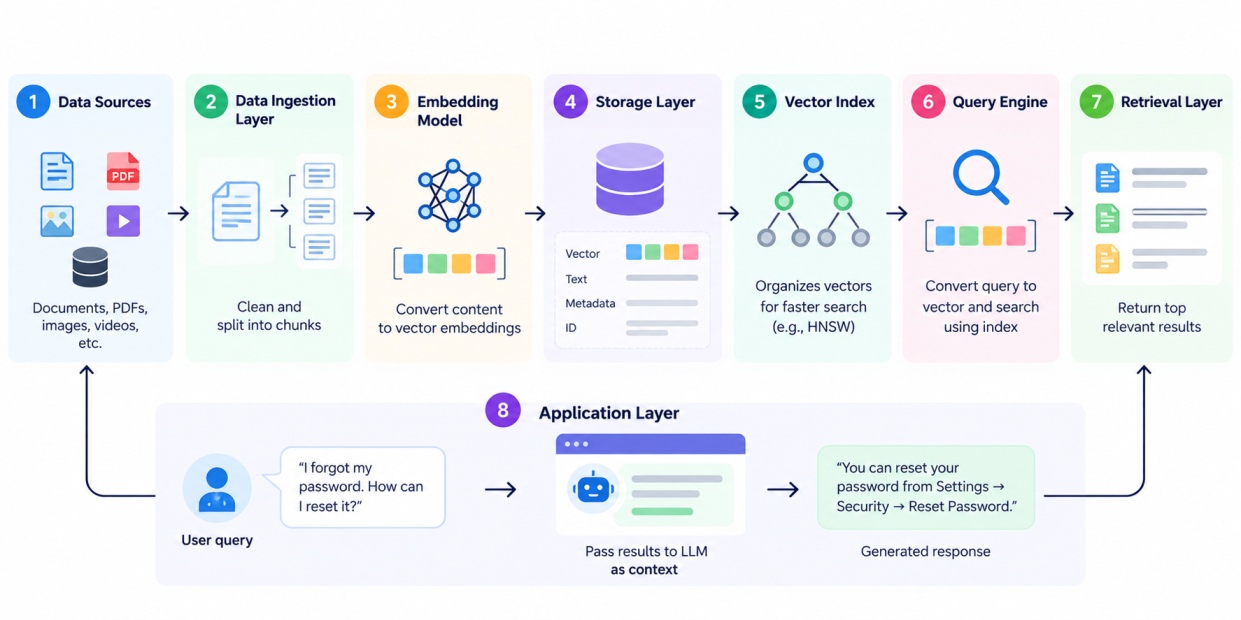
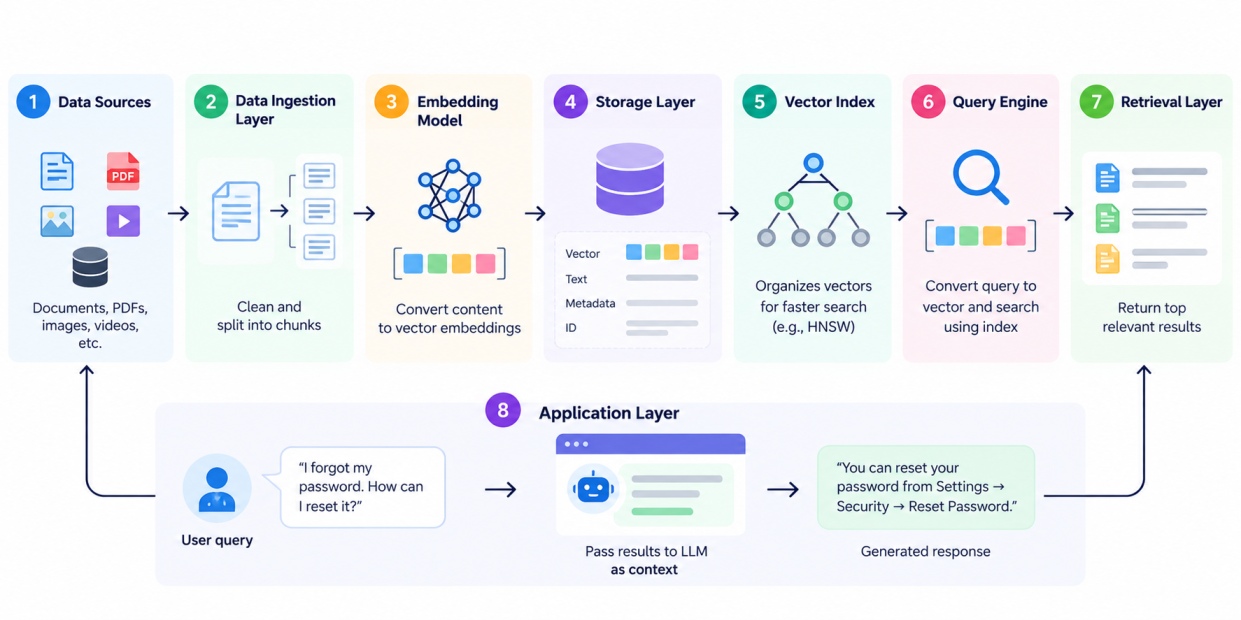
The architecture starts with the data that the system needs to store and search.
This can include:
Example of this is when customer service chatbot takes source data from hundreds of thousands of help documents.
2. Data Ingestion Layer
The data ingestion layer will be used to ingest this data in the vector database.The data might undergo cleaning before being stored, any extra data may be removed and documents will be segmented into smaller bits.
For example, if a 10-page support document is segmented, the system will retrieve only that portion which contains the answer to a user’s question.
Also Read: Decision Tree Algorithm in Machine Learning: How It Works, Types, and Examples
3. Embedding Model
The embedding model converts the processed content into numerical vectors.
For example:
“You can reset your password from the Security section.”
can be represented as:
[0.21, -0.14, 0.57, 0.32, ...]
Embedding model is independent of vector database, yet it is crucial for preparing data to be stored in the database.
4. Storage Layer
The storage layer stores the generated vectors.
It can also store:
For example:
Vector: [0.21, -0.14, 0.57, ...]
Text: You can reset your password from the Security section.
Category: Account
Language: English
Updated: January 2026
5. Vector Index
The vector index is what makes vector searches faster. If there are millions of vectors within a database, manually searching through each one could take a considerable amount of time.
By indexing vectors using techniques like HNSW, it becomes easier to locate neighboring vectors quickly.
The focus of the index is on how the vectors may be searched in an efficient manner.
6. Query Engine
The query engine handles incoming search requests.
When a user searches:
“I forgot my password. How can I reset it?”
The query is converted into a vector by the embedding model and sent to the vector database. The query engine then uses the available index and search settings to find relevant vectors.
It may also handle:
7. Retrieval Layer
The retrieval layer takes the results from the vector search and selects the records that are most relevant to the user's query.
For example, it may return the top three results:
How to reset your password
Recover your account
Update your account security settings
The application can then use one or more of these results.
Also Read: Logistic Regression in Machine Learning: Algorithm, Types, Examples, and Applications
8. Application Layer
This is where the database of vectors is connected to the application through which the user interacts.
In other words, when dealing with a chatbot for customer service, the obtained data can be supplied to the LLM as context.
The LLM can then generate a response such as:
“You can reset your password by going to Settings → Security → Reset Password.”
Now let’s explore what different types of Popular Vector Databases available right now.
Popular Vector Databases and Their Differences
Popular vector database names include Pinecone, Weaviate, vector database mongodb etc. Let’s explore difference between these below:
Vector database | Key strength | Deployment / positioning | Common use |
Pinecone Vector Database | Managed vector search | Cloud-focused | Production AI and RAG applications |
Milvus | Large-scale vector search | Open source and cloud options | Large AI and retrieval workloads |
Weaviate | Vector and hybrid search | Open source and cloud | Semantic search and RAG |
Qdrant | Vector similarity search and filtering | Open source and cloud | AI retrieval and recommendation systems |
MongoDB Vector Search | Vector search alongside application data | MongoDB ecosystem | RAG and applications already using MongoDB |
Chroma | Simple vector storage and retrieval | Developer-friendly | Prototypes and smaller AI applications |
What About FAISS vector database?
Many people are confused that FAISS vector database or not. But FAISS is technically a similarity-search library rather than a full database.
Meta's Artificial Intelligence research team developed FAISS, which is an open-source library designed to efficiently search for similarities and clustering of dense vectors on either CPU or GPU. It even has Python bindings.
Also Read: Supervised vs Unsupervised Learning: Differences, Examples, and Applications
Let’s understand the vector database with the help of a example in Python.
Vector Database Example in Python
A basic approach to learn about vector search in Python is by creating embeddings and comparing them using FAISS.
First, install the required libraries:
pip install sentence-transformers faiss-cpu
Then create embeddings for a few sentences:
from sentence_transformers import SentenceTransformer
import faiss
# Load an embedding model
model = SentenceTransformer("all-MiniLM-L6-v2")
documents = [
"Python is widely used for data analysis.",
"Machine learning helps computers learn from data.",
"Deep learning uses neural networks.",
"Pandas is a Python library for data manipulation."
]
# Convert documents into vectors
embeddings = model.encode(documents)
# Get vector dimensions
dimension = embeddings.shape[1]
# Create a FAISS index
index = faiss.IndexFlatL2(dimension)
# Add vectors to the index
index.add(embeddings)
Now create an embedding for a query:
query = "Python libraries for working with data"query_embedding = model.encode([query])
Search for the closest results:
distances, indices = index.search(query_embedding, k=2)for i in indices[0]: print(documents[i])
Output:
Pandas is a Python library for data manipulation.
Python is widely used for data analysis.
Applications of Vector Databases
Vector databases are now used across AI and information retrieval applications. Some of the common applications are:
Application | How vector databases are used |
RAG | Retrieve relevant documents before an LLM generates a response |
Semantic search | Find content based on meaning rather than exact keywords |
Recommendation systems | Find products, movies, articles, or other items with similar characteristics |
Image search | Retrieve visually or semantically similar images |
Customer support | Match user questions with relevant knowledge-base content |
Enterprise search | Search internal documents using natural-language queries |
Fraud detection | Identify transactions with patterns similar to known cases |
Personalisation | Match users with content or products based on embeddings |
Code search | Find code with similar functionality or meaning |
Multimodal AI | Search across text, images, audio, or other vectorised content |
Vector Database for RAG
One of the most common applications is RAG. A typical vector database for RAG follows this flow:
Documents
↓
Chunking
↓
Embedding Model
↓
Vector Database
↓
User Query
↓
Query Embedding
↓
Similarity Search
↓
Relevant Context
↓
LLM
↓
Final Response
Every technology comes with a pro and cons, that’s the vector database also. So let’s take a look at advantages and disadvantages of vector database.
Also Read: Linear Regression in Machine Learning: Types, Algorithm, and Implementation
Advantages and Limitations of Vector Databases
Vector databases are particularly useful for AI retrieval, but they also introduce new design considerations.
Advantages of Vector Databases
1. Semantic search: The searches can be semantic-based and not keyword-matching.
2. Fast retrieval of similar results: Vector indexing allows faster searching of collections compared to linear scanning through each stored vector.
3. RAG support: Vector databases are often used for retrieving contextual information for language models.
4. Searches using multimodal data: A vector space representation is feasible for text, images, audio, and different types of data based on the selected embedding model and database.
5. Filter criteria on metadata: Applications can combine vector search with different filters like category, date, location, and user ID, among others.
Limitations of Vector Databases
1. Embedding quality matters: Quality of the embedding influences the quality of search results.
2. Indexing has trade-offs: Indexing has its tradeoffs between faster search and memory consumption, build time, or recall.
3. Storage costs: Big collection of embeddings requires storage resources.
4. Model-dependent: Changing the embedding model means re-embedding existing data.
5. Not a replacement for every database: Applications still need traditional databases for many transactional and relational workloads.
Conclusion
Now, at this point if someone ask you, what is a vector database meaning? You can confidently answer: It is made for storing and retrieving vector representations based on similarity. It combines embeddings, vector indexing, search, metadata, and retrieval capabilities to support modern AI applications.
From semantic search and recommendations to RAG systems and enterprise assistants, vector databases have become an important part of many AI architectures.