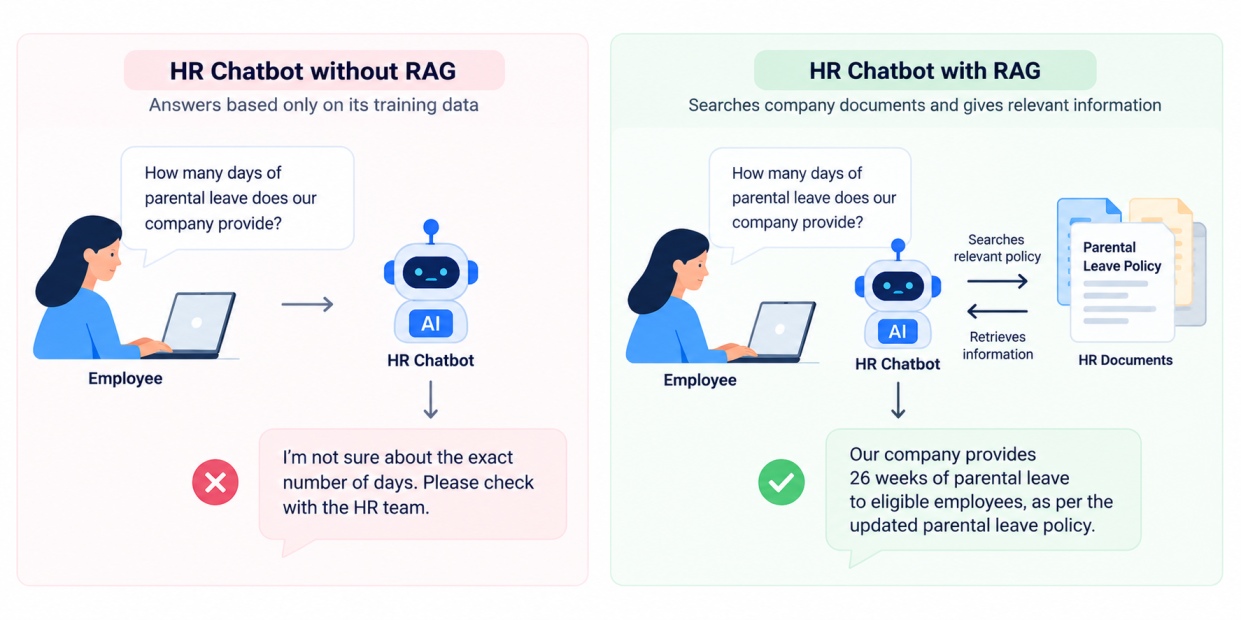
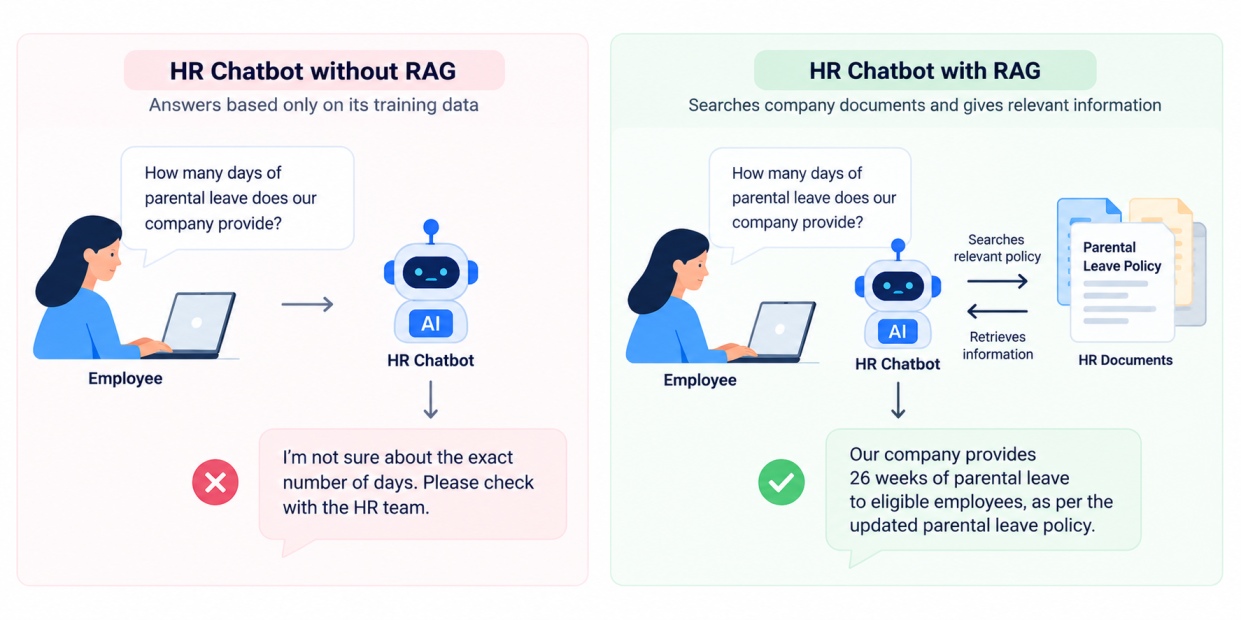
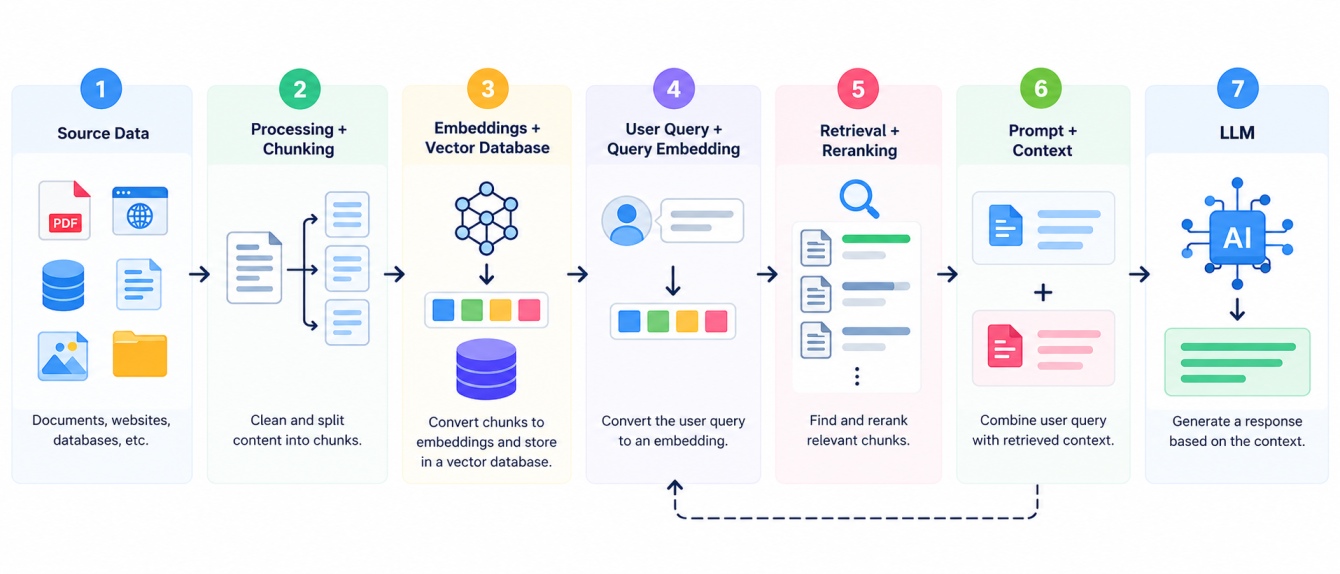
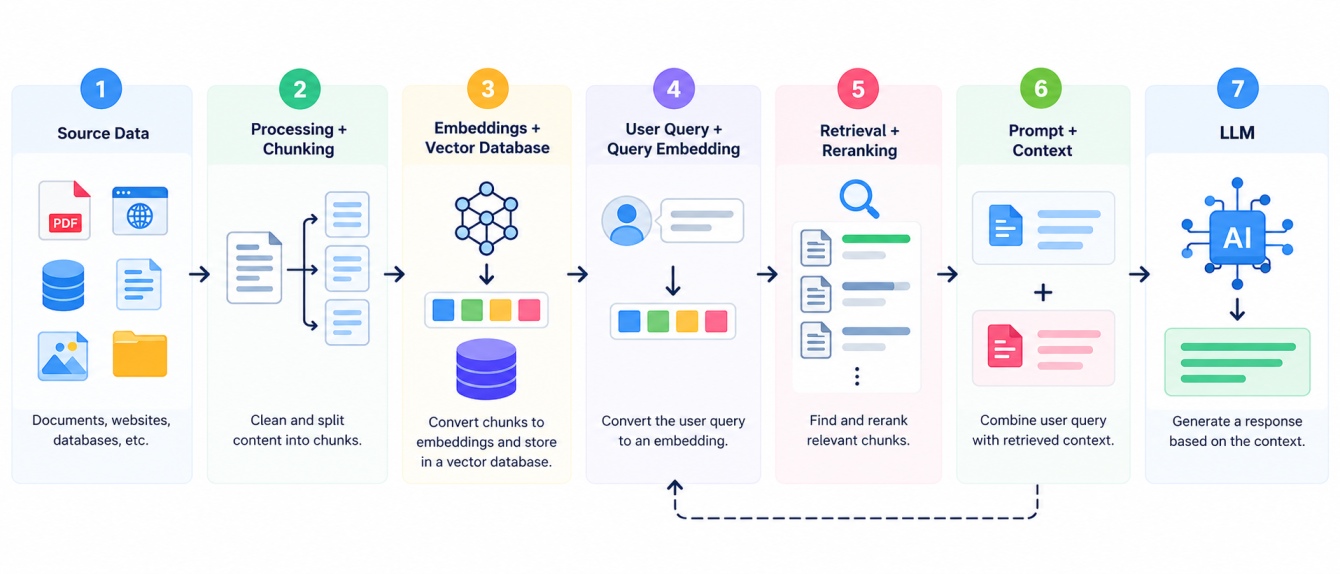
Let’s understand each and every step with an example of HR chatbot, same as we discussed earlier.
1. Collect and Prepare the Source Data
The first step is to collect the information or source data that a retrieval augmented generation system need. This data can be PDFs, databases, website, company internal documents, etc.
Then the system cleans and prepares the content by removing unnecessary things like repeated text or irrelevant information.
Example:
An organization wants to build an HR assistant chatbot. It will collect:
5 employee handbooks
3 leave policy documents
2 benefits documents
4 payroll documents
So, the system starts with 14 documents that contain employee-related information.
2. Split the Data Into Chunks and Create Embeddings
If there are very large documents, then they will be divided into smaller portions which are called as chunks. These chunks, then will convert into a numerical vector using an embedding model.
This allows the system to compare the meaning of different texts in the data.
Example:
Suppose a leave policy document contains 10,000 words. The system divides it into around 100 chunks.
One chunk may contain: “Employees are entitled to 20 days of annual leave every year.”
The embedding model converts this text into a numerical vector, such as:
[0.21, -0.45, 0.73, 0.18, ...]
The same process is applied to all 100 chunks.
3. Store the Embeddings in a Vector Database
The generated embedding from the last step, then stored in vector database. The database also stores the original text and meta data such as document name, department, date etc.
Example:
The system has created 1,500 chunks from all its HR documents.
Each record may contain:
Chunk ID: 248
Text: "Employees are entitled to 20 days of annual leave..."
Document: Leave Policy 2026
Department: HR
Embedding: [0.21, -0.45, 0.73, ...]
The vector database now allows the system to quickly find chunks that are semantically related to a user query.
4. Convert the User Query and Retrieve Relevant Information
Now, whenever a user asks a question, the query will be converted into an embedding. The system then compare the query embedding with stored embedding and retrieves the most relevant chunks.
Example:
The employee asks: “How many annual leave days do I get?”
The query is converted into a vector and compared with 1,500 stored vectors.
The system may retrieve the top 5 most relevant chunks.
For example:
Annual leave policy
Employee leave guidelines
Leave eligibility rules
Leave approval process
Holiday policy
A reranking model may then reorder these results and place the most useful passage first.
Also Read: Supervised vs Unsupervised Learning: Differences, Examples, and Applications
5. Add the Retrieved Context to the Prompt
Now the user’s question and the information retrieved will be combined into a single prompt.
This gives the LLM the specific information it needs to answer the question instead of relying only on its knowledge it have.
Example:
The system creates a prompt containing:
Question:
How many annual leave days do I get?
Retrieved Context:
"Employees are entitled to 20 days of annual leave every year."
The LLM now has the relevant company policy available as context.
6. Generate the Final Response
The LLM uses the user's question and retrieved context to generate the final answer.
Example:
The system responds: “According to the company leave policy, employees receive 20 days of annual leave each year.”
This is what makes retrieval augmented generation useful for applications that need answers based on specific, updated, or private information.
RAG can be built in different ways depending on the type of data, retrieval method, and complexity of the application. Let’s explore the types of retrieval-augmented generation.
Also Read: Logistic Regression in Machine Learning: Algorithm, Types, Examples, and Applications
Types of Retrieval Augmented Generation
There are different types of retrieval-augmented generation including Naive RAG, Advanced RAG, Hybrid RAG and Agentic RAG. Let’s discuss each of them in detail.
1. Naive RAG
Naive RAG is a basic form of retrieval augmented generation. It retrieves the relevant chunks from a source data or knowledge base and pass it to the LLM.
How it works:
Documents → Embeddings → Vector Database → Query → Retrieval → LLM → Response
Example:
An employee asks, “How many annual leave days do I get?” The system retrieves the relevant leave policy and gives it to the LLM to generate an answer.
2. Advanced RAG
Advanced RAG improve the basic retrieval process by adding different types of techniques like better chunking, query rewriting, metadata filtering, reranking, and improving the retrieval.
Example:
Instead of searching only for “annual leave,” the system may rewrite the query as “number of annual leave days available to employees” and then retrieve more relevant passages.
3. Hybrid RAG
Hybrid RAG combines different retrieval methods, usually keyword search and semantic search.
Keyword search helps find exact terms, while semantic search helps find content with similar meaning.
Example:
A user searches for: “PF withdrawal rules”
Keyword search can find documents containing “PF” and “withdrawal,” while semantic search can also find content discussing “provident fund withdrawal eligibility.”
4. Graph RAG
Graph RAG use a knowledge graph for the retrieval of information and making relationships between different entities. Instead of treating information as an independent text chunk, it understand the connections between people, products, organizations etc.
Example:
A user asks: “Which projects are handled by employees in the AI team?”
The system can use relationships between employees, teams, projects to find the relevant information.
5. Conversational RAG
Conversational RAG is designed for applications where users ask multiple questions in a conversation. It consider the previous questions and answers also while retrieving new information.
Example:
User: “What is the company’s parental leave policy?”
AI: “Employees can take 26 weeks of parental leave.”
User: “Who is eligible for it?”
The system uses the previous conversation to understand that “it” refers to parental leave.
6. Agentic RAG
Agentic RAG combines RAG with AI agents. The system can decide what information to retrieve, which tools to use, and whether another retrieval step is needed before answering.
Example:
A user asks: “Compare our 2025 and 2026 sales performance and explain the main reasons for the change.”
The system may retrieve sales reports, query a database, compare the results, retrieve supporting documents, and then generate the final answer.
Also Read: Decision Tree Algorithm in Machine Learning: How It Works, Types, and Examples
What Are the Applications of Retrieval Augmented Generation?
RAG is used in many areas such as Customer support, HR assistants, Technical support, etc. Below are some of the common applications of retrieval-augmented generation:
Application | How RAG is used |
Customer support | Retrieves relevant help articles before answering customer questions |
Enterprise search | Finds information from internal documents and knowledge bases |
HR assistants | Retrieves company policies, benefits, and employee guidelines |
Healthcare information systems | Retrieves relevant medical or organisational documents |
Legal research | Finds relevant contracts, cases, or legal documents |
Education | Answers questions using course material and learning resources |
E-commerce | Retrieves product information before answering customer queries |
Financial services | Searches internal documents and approved information sources |
Technical support | Retrieves manuals, guides, and troubleshooting documents |
To make a retrieval augmented generation pipeline you can use several tools. So now let’s discuss these tools with the help of a quick table.
Also Read: Gradient Boosting Algorithm in Machine Learning: How It Works, and Practical Examples
Popular Tools for Building RAG Applications
There are tools and technologies such as LangChain, LlamaIndex, FAISS, etc. Let’s explore each of them with how they can be used:
Tool / Technology | Common role |
LangChain | Building LLM, retrieval, and RAG workflows |
LlamaIndex | Connecting LLM applications with external data |
Haystack | Building search and RAG pipelines |
Pinecone | Managed vector database and retrieval |
Weaviate | Vector search and hybrid retrieval |
Qdrant | Vector similarity search and filtering |
Milvus | Large-scale vector retrieval |
FAISS | Similarity search over dense vectors |
Sentence Transformers | Generating text embeddings |
OpenAI embeddings | Generating vector representations for retrieval |
Elasticsearch | Keyword, vector, and hybrid search |
Common Challenges of Retrieval-Augmented Generation (RAG)
Retrieval augmented generation in AI have some challenges such as incorrect data, high cost, poor chunking. Let’s discuss each of these challenges in detail:
1. Poor Retrieval Quality
The system can retrieve the information that is not relevant to the user’s query which can lead to incorrect or incomplete information.
Example:
A user asks about the 2026 leave policy, but the system retrieves a document from 2024 instead.
2. Incorrect or Irrelevant Data
The response quality is also depends on the quality of the data stored in the knowledge base. If there is some outdated, duplicated or wrong information, this will affect the final answer.
Example:
A company updates annual leave from 20 days to 25 days, but the old policy is still stored. The RAG system may return the outdated 20-day rule.
3. Poor Chunking
In the process of chunking, it is necessary to divide them in useful chunks. If the chunks are too large, they may contain unnecessary information or if they are too small, it may lose the important information.
Example:
A leave policy sentence explaining eligibility and leave limits is split into two different chunks. The system retrieves only one and misses part of the rule.
4. Context Limitations
LLMs can process only a limited amount of information at a time. If they retrieves too much information at once, this will make harder for the model to identify what matters or what not.
Example:
A system retrieves 50 passages for one question, even though only 5 passages are relevant. The extra information can make the response less focused.
5. High Cost and Latency
RAG requires so many steps such as embedding, retrieval, reranking, and generation. These all steps can increase the response time and computational costs.
Example:
A complex RAG application may perform 3 to 5 retrieval or processing operations before generating one response, making it slower than a simple LLM query.
6. Hallucinations
As discussed earlier, retrieval-augmented generation can reduce the hallucinations, but it cannot totally eliminate it. An LLM may still generate unsupported information when the retrieved context is incomplete or unclear.
Also Read: Support Vector Machine (SVM) in Machine Learning: Algorithm, Types, Kernels, and Examples
Conclusion
So, now if someone asks you “what is rag in ai?”, you can confidently answer that it connects language models with external sources so they can use relevant context while generating responses. The process of RAG involves document processing, chunking, embeddings, retrieval, and LLM generation.
Retrieval augmented generation is useful for enterprise search, customer support, document assistants, research systems, and other applications that need access to specialised information.