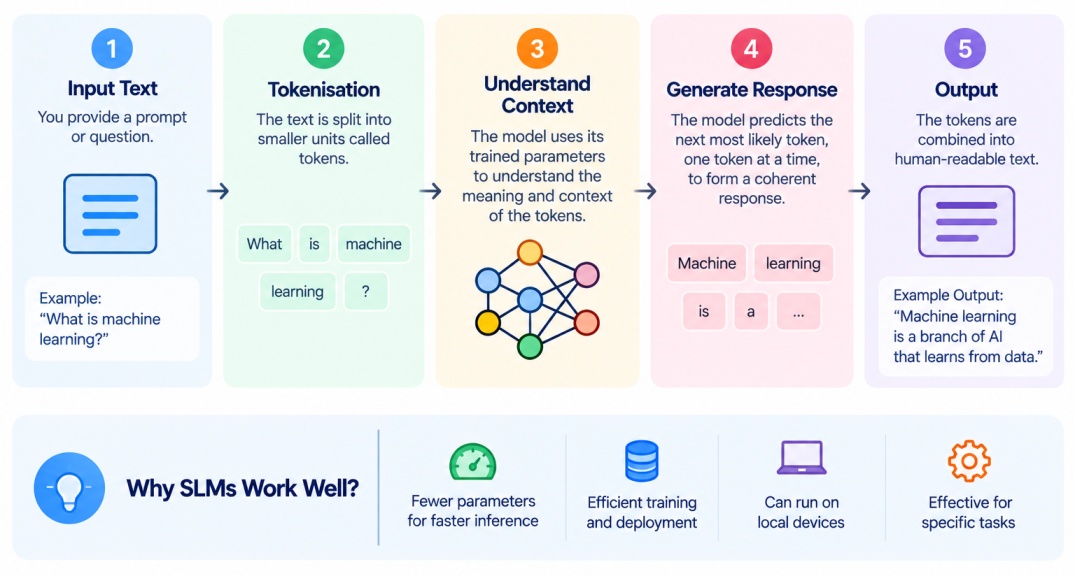
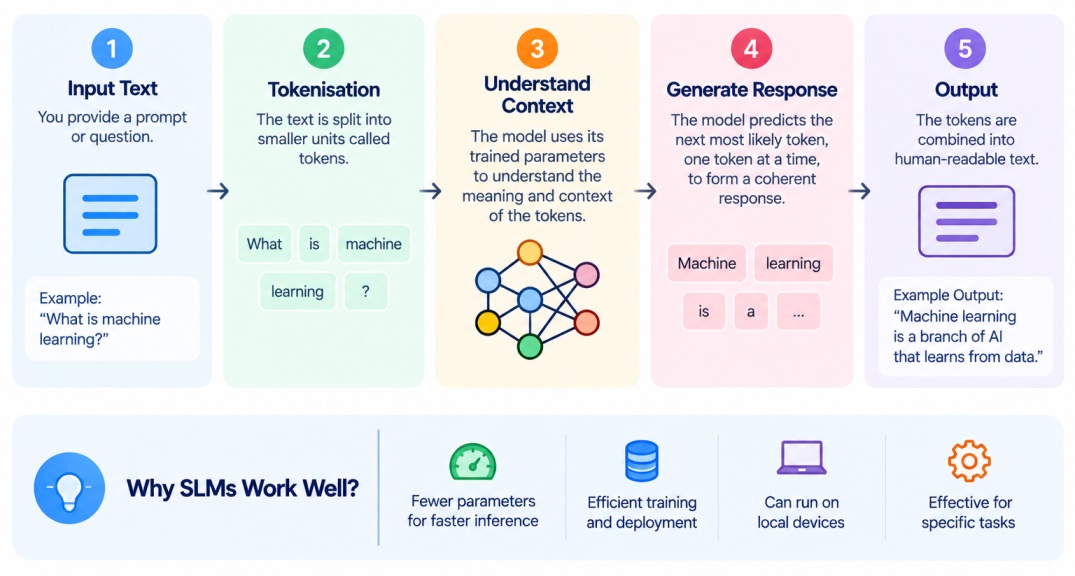
Input text is provided to the model.
The text is tokenised into smaller units called tokens.
Tokens are converted into numerical representations.
The model processes these representations using its neural network architecture.
The model predicts the next token or relevant output based on the context.
The process continues until the required response is generated.
Now let’s take a quick look at the difference between Small Language Models and LLMs.
Also Read: Top 5 Generative AI Courses With Certifications in 2026
Small Language Models vs Large Language Models
Small and large language models can both perform language-related tasks, but the main difference is of model size, resource requirements, deployment options, and often their breadth of capabilities. The difference between both are:
Factor | Small Language Models | Large Language Models |
Model size | Relatively smaller | Generally much larger |
Computational requirements | Lower | Higher |
Memory requirements | Lower | Higher |
Inference cost | Usually lower | Usually higher |
Latency | Can be lower | Can be higher depending on model and hardware |
Local deployment | More practical in many cases | Often requires more powerful infrastructure |
Edge deployment | Suitable for many use cases | More challenging |
General-purpose capability | Often more focused | Generally broader |
Domain-specific deployment | Well suited | Can also be adapted |
Privacy-sensitive applications | Can support local deployment | Can also be deployed privately with sufficient infrastructure |
Scalability | Suitable for lightweight applications | Suitable for complex, large-scale applications |
Choosing between both models does not simply depend on whether a model is small or large. The right option to choose a language model depends on the complexity of the task, available resources, latency requirements, privacy needs, expected quality, and deployment environment.
Small Language Models are of different types which are used for different use cases. So now let’s explore them in detail.
Also Read: Feature Selection in Machine Learning: Methods, Techniques & Choosing the Right Features
Types of Small Language Models
Small language models can be grouped based on their architecture, purpose, and deployment requirements. Below are some of the common types of SLMs.
1. Task-Specific Small Language Models
These models are designed or fine-tuned for a particular task.
Examples include models developed for:
Text classification
Sentiment analysis
Question answering
Summarisation
Information extraction
2. General-Purpose Small Language Models
These models are designed to perform multiple language tasks while maintaining a smaller footprint.
They can be used for:
Text generation
Question answering
Summarisation
Basic reasoning
Content transformation
3. Domain-Specific Small Language Models
These models are used and made for a specific industry or knowledge domain.
For example, an organization may fine-tune an SLM on internal documentation to create a specialised knowledge assistant.
4. Edge and On-Device Language Models
These models are designed to run on local devices or resource-constrained environments.
Devices include:
Smartphones
Laptops
IoT devices
Edge servers
Embedded systems
Also Read: Hyperparameter Tuning in Machine Learning: Methods, Techniques, and Tools
Popular Small Language Models
A number of small language models are widely used in production today, used by several major developers.
Gemma 3 (Google DeepMind), available from a tiny 270 million parameters up through 1B, 4B, 12B, and 27B variants, natively multimodal across text and images, with a 128K token context window and support for more than 140 languages, making it one of the most flexible small language model families for on-device deployment.
Llama 3.2 (Meta), offering 1B and 3B text-only variants built specifically for on-device use, alongside larger 11B and 90B vision-capable versions, released under Meta's community license.
Phi-4-mini (Microsoft), a roughly 3.8 billion parameter instruction-tuned model from Microsoft's Phi family, built to punch above its size on reasoning and coding benchmarks relative to its parameter count.
Qwen3 small variants (Alibaba), spanning from roughly 0.5B up through 8B parameters under an Apache 2.0 license, a strong choice among open source small language models known for strong multilingual and coding performance relative to their size, including specialised coder variants that make Qwen3 a common pick among small language models for coding tasks.
SmolLM2 (Hugging Face), offered at 135M, 360M, and 1.7B parameters, trained on a large, carefully curated token count and released under Apache 2.0, explicitly designed and benchmarked for on-device deployment.
MiniCPM, ranging from roughly 1B to 4B parameters, built to balance strong performance against tight resource efficiency.
One of the best benefits is that you can run Small Language Models locally. So, now let’s explore the steps to run it locally.
Also Read: Supervised vs Unsupervised Learning: Differences, Examples, and Applications
How to Run a Small Language Model Locally?
The exact installation process depends on the model and the tool you choose. Ollama is one of the simplest options for beginners because it handles model downloading, setup, and local execution through simple commands.
To run a small language model locally you can follow these steps:
Step 1: Choose a Suitable Model
First, select an SLM that matches your requirements. Check:
Model size
Task requirements
RAM and GPU requirements
Supported languages
Licence
Expected performance
If your computer has limited resources, look for a smaller or quantised version of the model.
Step 2: Check Your Hardware
Before installing the model, check whether your computer has enough resources to run it.
You should consider:
RAM: Determines how much of the model can be loaded into memory.
GPU memory: Important if you plan to use a GPU for faster inference.
Storage: Models can range from hundreds of MBs to several GBs.
Processor: Your CPU can affect response speed when running without a GPU.
Step 3: Install a Local Model Runner
You need a tool that can download and run the model on your computer.
For beginners, Ollama provides a simple way to run supported models locally.
The basic process is:
Download and install Ollama for your operating system.
Open your Terminal or Command Prompt.
Check that Ollama is installed correctly by running:
ollama --version
If the installation is successful, the command displays the installed Ollama version.
Other options include llama.cpp, which provides more control over how compatible models are loaded and executed.
Step 4: Download an SLM
Once Ollama is installed, you can download a supported model using the ollama pull command.
For example:
ollama pull <model-name>
Replace <model-name> with the model you want to use.
Ollama downloads the model files and stores them locally on your computer. The download size depends on the model and its quantisation level.
Step 5: Run the Model
After downloading the model, start it with:
ollama run <model-name>
The model will start locally, and you can enter prompts directly in the terminal.
For example:
>>> Summarise this paragraph in three points.
The model processes the prompt on your computer and generates the response locally.
Step 6: Use the Model for Different Tasks
Once the model is running, you can use it for tasks such as:
You can also connect the local model to applications through APIs, depending on the tool and model you use.
Step 7: Optimize the Local Deployment
If the model is slow or uses too much memory, you can improve its local performance through techniques such as:
Quantization: Uses lower-precision numbers to reduce model memory requirements.
Model compression: Reduces the size of the model.
Hardware acceleration: Uses compatible GPUs or other accelerators.
Batching: Processes multiple inputs together where supported.
Prompt optimization: Reduces unnecessary input and output tokens.
Below are some of the common errors which the user faces. If you have installed in one go, well and good, you can skip to the next section of real life applications otherwise check out the common errors.
Also Read: Classification vs Regression in Machine Learning
Common Errors When Running an SLM Locally
1. Insufficient RAM or GPU Memory
Error: The model fails to load or the system becomes extremely slow.
Cause: The model requires more memory than your computer has available.
Solution: Use a smaller or quantised model, close unnecessary applications, or run the model using CPU if supported.
2. Model Not Found
Error: Error: model not found
Cause: The model name is incorrect or the model has not been downloaded.
Solution: Check the model name and download it first:
ollama pull <model-name>
Then run:
ollama run <model-name>
3. Ollama Command Not Recognised
Error: 'ollama' is not recognized as an internal or external command
Cause: Ollama is not installed correctly or its executable is not available in the system PATH.
Solution: Reinstall Ollama and restart your Terminal or Command Prompt.
4. Not Enough Storage
Error: The model download stops or fails because there is not enough disk space.
Cause: Language models can require several GB of storage.
Solution: Free up disk space or choose a smaller model.
5. Slow Model Responses
Problem: The model takes a long time to generate responses.
Possible causes:
Solution: Try a smaller or quantized model or use compatible GPU acceleration.
Now let’s explore the real world applications which are currently used by different industries.
Also Read: Reinforcement Learning (RL) in Machine Learning: How It Works, Algorithms and Types
Real-World Applications of Small Language Models
Small Language Models can be useful when an application needs language capabilities without the infrastructure requirements of a large model. Some common applications include:
Application | How SLMs Can Be Used |
Customer support | Handle frequently asked questions and basic customer queries |
Text classification | Categorise documents, emails, tickets, or messages |
Sentiment analysis | Identify sentiment in customer feedback or social media text |
Document summarisation | Generate concise summaries of documents |
Information extraction | Extract names, dates, entities, or other structured information |
Coding assistance | Provide lightweight code completion or explanation |
Edge AI | Run language-based applications closer to where data is generated |
On-device assistants | Support local text-based assistance on compatible devices |
Enterprise knowledge systems | Answer questions using domain-specific organisational information |
Privacy-sensitive applications | Process selected information locally instead of sending it to external services |
Advantages and Disadvantages of Small Language Models
SLMs offer several practical benefits, but their smaller size can also create limitations.
Advantages of Small Language Models
Lower Resource Requirements: Small language models generally require less memory and computational power than much larger models.
Faster Inference: Their smaller size can allow faster processing and lower latency, depending on the hardware and workload.
Lower Deployment Costs: Reduced infrastructure requirements can make SLMs more economical for certain applications.
Local Deployment: Some SLMs can run locally on laptops, mobile devices, edge systems, or private infrastructure.
Better Privacy Control: Local deployment can help organisations keep sensitive data within their own environment.
Disadvantages of Small Language Models
Limited General Capabilities: A smaller model may not match a much larger model on complex, broad, or highly specialised tasks.
Reduced Context and Reasoning Capability: Depending on the architecture and training, some SLMs may struggle with long contexts or complex reasoning tasks.
Domain Knowledge Limitations: A compact model may have less broad knowledge than a larger general-purpose model.
Performance Trade-Offs: Reducing model size can involve trade-offs between computational efficiency and output quality.
Fine-Tuning May Still Require Resources: Although smaller models are easier to adapt than some large models, fine-tuning can still require appropriate datasets, hardware, and technical expertise.
Also Read: Bias Variance Tradeoff in Machine Learning: Concept, Examples, and Techniques
Conclusion
Small Language Models provide a compact approach to building language-based AI applications. Their lower resource requirements can make them suitable for local deployment, edge computing, privacy-sensitive applications, and specialised tasks.
The key difference between small and large language models is not simply parameter count. Factors such as task complexity, deployment environment, latency, cost, privacy, and expected performance also matter.