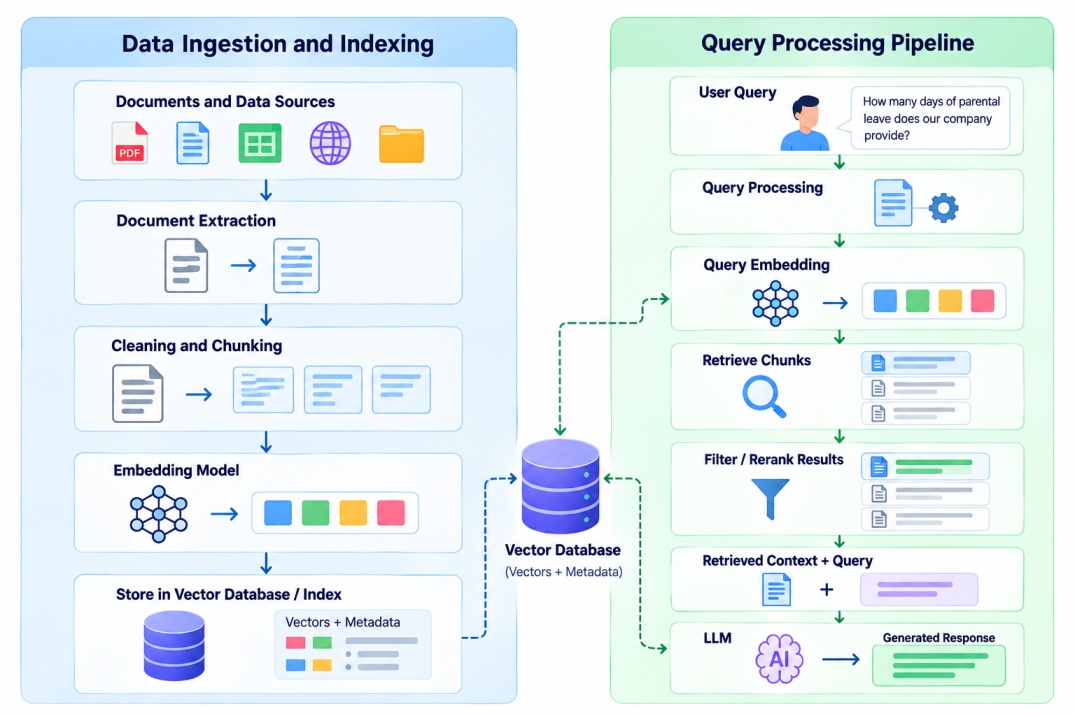
Now let’s explore the core components of RAG architecture in detail to understand the topic more clearly.
Core Components and Phases of RAG Architecture
The RAG Architecture consists of mainly three phases and components such as Data Source, Embedding models, Reranking model, etc. Let’s explore each phase and component, what specific role each phase and component has.
Phase 1: Data Preparation and Indexing
1. Data Sources
Data sources provide the information that a RAG system uses to answer questions. Data sources are the information that a RAG system uses to answer questions. Common sources includes PDF files, documents, websites, different databases, articles etc.
In the example discussed above the HR assistant can use 4 types of sources such as employee handbooks, leave policies, benefits documents, and company guidelines.
2. Document Processor
The document processor is used to extract and prepare the information which is collected from different sources, so the system can read and search it.
It is also used to handle the formatting issues, repetitive content and missing text.
For example, it can extract text from PDFs, removing unnecessary things from the websites and more.
3. Chunking Strategy
In chunking, it divides a long document into smaller sections by which the system can search specific information.
For example, in HR assistant model a 50 page employee handbook can be divided into smaller sections which covers the leave policies, payroll, workplace conduct, and employee benefits.
4. Embedding Model
An embedding model is used to convert each text chunk into a numerical vector that shows its meaning. The question asked by the user is also converts into a vector so the system can search for the related content only.
For example, If any employee asks, "How many paid leaves do I get?" and "What is my annual leave allowance?" Both are same thing but the wording are different. So the embedding model help the system to identify this relationship.
5. Vector Database and Index
A vector database is used to store the embeddings and some related information like text, document IDs and metadata.
The indexes in the vector database helps the system to search in large collections without comparing each stored vectors individually.
Some common technologies are FAISS, Pinecone, Qdrant, Milvus, and Weaviate. FAISS is similarity search technology, whereas the rest provides vector databases or search functionality.
Also Read: What Is Semantic Search? How It Works, Benefits & Examples
Phase 2: Query Processing, Retrieval, and Generation
1. Retriever
Retriever's function is to retrieve the relevant data from the indexed data set. It can involve vector similarity search, keyword search, metadata filtering, or any combination of these techniques.
For instance, if an employee queries about the annual leave, then the retriever will fetch the relevant data regarding leave policies from the HR documents stored.
2. Reranking Model
Once the retrieval process provides the response, then there may be 10 types of information, which is not necessarily the case as all the 10 types of information are equally relevant.
So, the reranking model comes to test the query against all the collected information and ranks the most relevant at the top.
3. Large Language Model (LLM)
The role of LLM is to provide the response by using the information collected and the user’s query in natural language.
For example, an employee asks, "How many paid leaves can I take in a year?" The LLM uses the relevant HR policy passage to explain the company's annual leave allowance.
The RAG system also able to tell the LLM to say when the available documents do not contain enough information, which help to reduce unsupported answers, but it does not guarantee that every response will be correct.
Phase 3: Evaluation and Monitoring
Evaluation and monitoring helps the developers check whether the RAG system works as expected or not.
They can track metrics such as:
Retrieval quality
Answer accuracy
Response time
Cost
Failure rate
Types of RAG Architecture
There are different types of RAG architecture such as Naive RAG, Agentic RAG, Corrective RAG (CRAG), and more which can be designed in different ways depending on the complexity of the task and the retrieval requirements.
Some common types of RAG Architecture are:
RAG Architecture | How It Works | Best Suited For |
Naive RAG | Retrieves relevant text chunks and sends them to an LLM to generate an answer. | Basic question-answering systems |
Hybrid RAG | Combines keyword search with vector search to find relevant information. | Enterprise search and document retrieval |
Graph RAG | Uses a knowledge graph to connect entities and relationships across documents. | Complex questions involving multiple relationships |
Agentic RAG | Uses AI agents to plan searches, call tools, and retrieve information in multiple steps. | Complex, multi-step tasks |
Self-RAG | Checks the need for retrieval and evaluates the relevance and support of generated answers. | Tasks that need better answer reliability |
Corrective RAG (CRAG) | Checks retrieved documents and triggers other search methods when results are weak. | Questions where initial search results may be insufficient |
Adaptive RAG | Chooses a retrieval approach based on the complexity of the question. | Systems handling simple and complex queries |
HyDE | Generates a hypothetical answer to help find relevant documents through vector search. | Queries that are difficult to match directly |
Multimodal RAG | Retrieves information from text, images, audio, video, and other formats. | Applications using different types of data |
Modular RAG | Uses separate modules for retrieval, routing, memory, and answer generation. | Systems that need flexible components |
Now let’s look at how you can build a RAG architecture in Python using OpenAI and FAISS.
Also Read: Supervised vs Unsupervised Learning: Differences, Examples, and Applications
Building a RAG Architecture in Python
You can build a basic Retrieval-Augmented Generation (RAG) system in Python using OpenAI embeddings, FAISS, and an LLM.
In this example, you will build an HR assistant that answers employee questions using company policy documents.
The system follows these 5 steps:
Step 1: Install the Required Libraries
Run this command in Google Colab or a Python notebook.
!pip install -q openai faiss-cpu numpy
You will use:
Library | Purpose |
openai | Creates embeddings and generates answers. |
faiss-cpu | Searches for relevant text chunks using vector similarity. |
numpy | Stores and normalizes numerical vectors. |
You also need an OpenAI API key. The code below asks for the key without displaying it on screen.
Step 2: Import Libraries and Set Up the API Key
import os
import getpass
import numpy as np
import faiss
from openai import OpenAI
# Enter your API key securely
if not os.getenv("OPENAI_API_KEY"):
os.environ["OPENAI_API_KEY"] = getpass.getpass(
"Enter your OpenAI API key: "
)
# Create the API client
client = OpenAI()
print("RAG environment is ready.")
Expected output:
Enter your OpenAI API key: [hidden]
RAG environment is ready.
Step 3: Create Sample HR Documents
In this example, the RAG system can use 5 sample documents which cover annual leave, sick leave, etc.
documents = [
{
"title": "Annual Leave Policy",
"text": (
"Full-time employees receive 20 paid annual leave days "
"per calendar year. Employees should submit annual leave "
"requests through the HR portal at least 5 working days "
"before the planned leave. A manager must approve each "
"request before the employee takes leave. Unused annual "
"leave can carry over up to 5 days into the next calendar "
"year. Part-time employees receive leave on a prorated "
"basis according to their contract."
)
},
{
"title": "Sick Leave Policy",
"text": (
"Employees receive 10 paid sick leave days per calendar "
"year. If an employee is absent for more than 2 consecutive "
"working days, the employee may be asked to provide a "
"medical certificate. Employees should inform their "
"manager as soon as possible when taking sick leave."
)
},
{
"title": "Parental Leave Policy",
"text": (
"Eligible primary caregivers can take 16 weeks of paid "
"parental leave after the birth or adoption of a child. "
"Eligible secondary caregivers can take 4 weeks of paid "
"parental leave. Employees should submit documents to HR "
"at least 30 days before planned leave when possible."
)
},
{
"title": "Health Benefits Policy",
"text": (
"Full-time employees can enroll in the company health "
"insurance plan after 30 days of employment. The plan "
"includes medical, dental, and vision coverage. Employees "
"can add eligible dependents during the enrollment period."
)
},
{
"title": "Working Hours Policy",
"text": (
"Standard working hours are 9:30 AM to 6:00 PM, Monday "
"through Friday, with a 1-hour lunch break. Employees "
"should record attendance in the HR portal. Flexible "
"schedules require manager approval."
)
}
]
print("Number of documents:", len(documents))
Expected output:
Number of documents: 5
Step 4: Split the Documents into Smaller Chunks
This step create chunks of up to 55 words, with an overlap of 10 words between consecutive chunks.
def split_text(text, chunk_size=55, overlap=10):
words = text.split()
chunks = []
start = 0
while start < len(words):
end = min(start + chunk_size, len(words))
chunks.append(" ".join(words[start:end]))
if end == len(words):
break
start = end - overlap
return chunks
# Split all documents and retain their titles
chunks = []
for document in documents:
text_chunks = split_text(document["text"])
for chunk_number, text_chunk in enumerate(text_chunks, start=1):
chunks.append({
"title": document["title"],
"chunk_id": chunk_number,
"text": text_chunk
})
print("Total text chunks:", len(chunks))
print("\nFirst text chunk:")
print(chunks[0]["text"])
Expected output:
The first chunk will contain text from the Annual Leave Policy.
Step 5: Generate Embeddings
Here, text-embedding-3-small creates the embeddings.
def create_embeddings(texts, batch_size=64):
vectors = []
for start in range(0, len(texts), batch_size):
batch = texts[start:start + batch_size]
result = client.embeddings.create(
model="text-embedding-3-small",
input=batch
)
# Keep embeddings in the same order as the input texts
batch_vectors = sorted(
result.data,
key=lambda item: item.index
)
vectors.extend(
item.embedding for item in batch_vectors
)
return np.array(vectors, dtype="float32")
# Create embeddings for all document chunks
chunk_texts = [chunk["text"] for chunk in chunks]
chunk_vectors = create_embeddings(chunk_texts)
print("Number of embeddings:", len(chunk_vectors))
print("Embedding dimensions:", chunk_vectors.shape[1])
Expected output:
Number of embeddings: [depends on the number of chunks]
Embedding dimensions: 1536
Step 6: Store Embeddings in a FAISS Index
The code normalizes the vectors and uses inner-product search to rank results by cosine similarity.
# Normalize vectors for cosine similarity search
faiss.normalize_L2(chunk_vectors)
# Create the vector search index
embedding_dimension = chunk_vectors.shape[1]
index = faiss.IndexFlatIP(embedding_dimension)
# Add the embeddings to the index
index.add(chunk_vectors)
print("FAISS index created successfully.")
print("Vectors stored:", index.ntotal)
Expected output:
FAISS index created successfully.
Vectors stored: [same as the number of chunks]
FAISS supports vector similarity search. This example uses an in-memory index, so the index is not retained when the runtime is reset.
Step 7: Retrieve Relevant Information
When an employee asks a question, the system converts it into an embedding and searches the FAISS index for the 3 most relevant chunks.
question = "How many paid annual leave days can a full-time employee take each year?"
# Convert the question into an embedding
question_vector = create_embeddings([question])
# Normalize the query vector
faiss.normalize_L2(question_vector)
# Retrieve the 3 most relevant chunks
top_k = min(3, len(chunks))
scores, indices = index.search(
question_vector,
top_k
)
retrieved_chunks = []
for score, chunk_index in zip(scores[0], indices[0]):
if chunk_index >= 0:
chunk = chunks[chunk_index]
retrieved_chunks.append({
"title": chunk["title"],
"text": chunk["text"],
"score": float(score)
})
print("Question:", question)
print("\nRetrieved sources:")
for item in retrieved_chunks:
print("-", item["title"])
Example output:
Question: How many paid annual leave days can a full-time employee take each year?
Retrieved sources:
- Annual Leave Policy
- Annual Leave Policy
- Sick Leave Policy
Step 8: Generate an Answer Using an LLM
The final step sends the question and retrieved passages to an LLM. The prompt tells the model to use the supplied documents and state when they do not contain the answer.
# Combine the retrieved chunks into context
context = "\n\n".join(
f"[Source: {item['title']}]\n{item['text']}"
for item in retrieved_chunks
)
# Generate a grounded answer
response = client.responses.create(
model="gpt-4.1-mini",
instructions=(
"You are an HR assistant. Answer the user's question "
"using only the supplied context. Keep the answer simple "
"and concise. Cite the source title in square brackets. "
"If the context does not contain the answer, say: "
"'I couldn't find that information in the available documents.'"
),
input=f"""
Question:
{question}
Retrieved context:
{context}
""",
store=False
)
print("Question:", question)
print("\nGenerated Answer:")
print(response.output_text)
Example output:
Question: How many paid annual leave days can a full-time employee take each year?
Generated Answer:
Full-time employees receive 20 paid annual leave days per calendar year.
You must submit your leave request through the HR portal at least
5 working days in advance and get approval from your manager.
[Annual Leave Policy]
The exact wording may vary because the LLM generates the response. The answer should still reflect the retrieved policy when the relevant passages are available.
Also Read: Decision Tree Algorithm in Machine Learning: How It Works, Types, and Examples
Conclusion
Now, it is easy for you to understand how RAG architecture combines data ingestion, embeddings, indexing, retrieval and LLM generation in a single workflow. It has two central pipelines which prepares the information for search and use the collected context to answer the user's questions.
Designing the right RAG design pattern depends on the data, complexity of query, and the expected answer quality. You can start with the Basic RAG and later move on to Graph RAG and agentic RAG for more complex tasks.