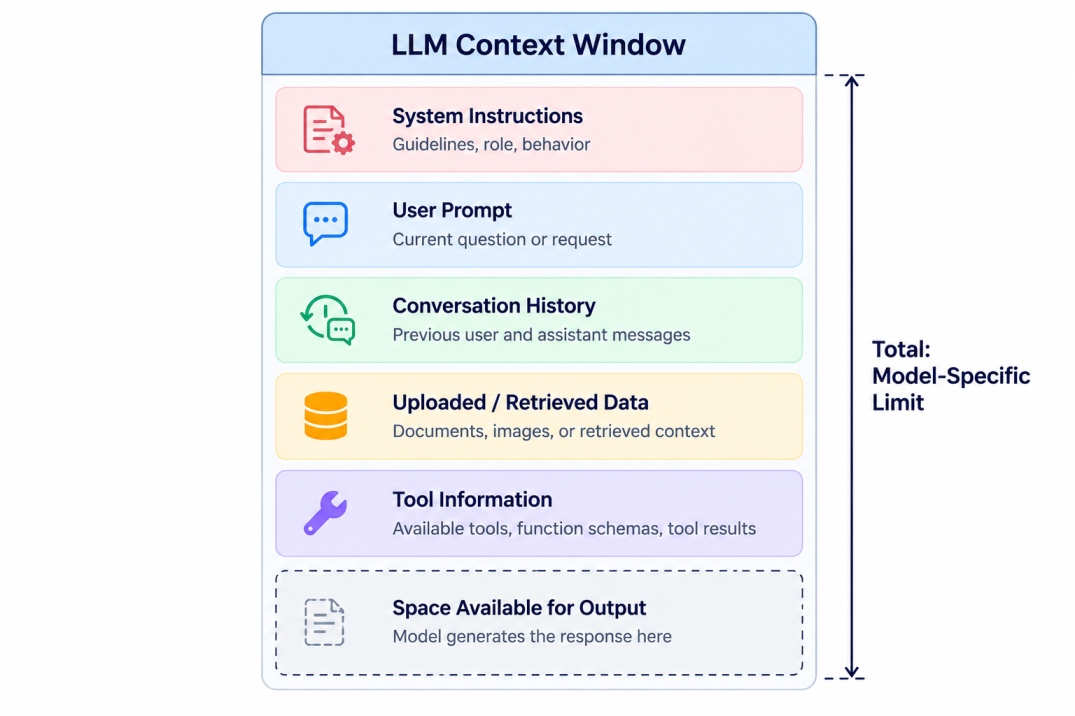
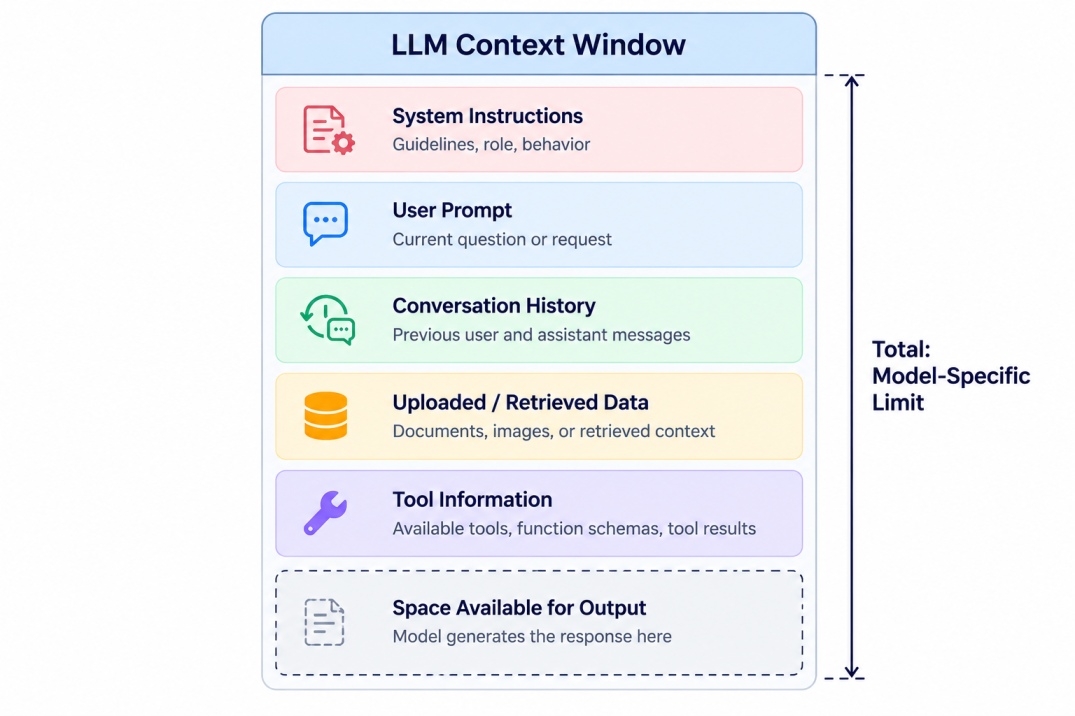
Component | What it includes | Example |
System instructions | Rules that guide the model's behaviour | Instructions to answer in simple language |
User prompt | The question or task provided by the user | "Summarize this report" |
Conversation history | Relevant previous messages in the conversation | Earlier questions and answers |
Supporting documents | Text from uploaded files or retrieved sources | A 100-page PDF report |
Tool information | Tool definitions, outputs, and results included in the request | Search results or code execution output |
Input images and audio | Model-specific representations of visual or audio information | A photograph or audio recording |
Generated response | The answer produced by the model | A report summary |
Reasoning tokens | Tokens used for internal reasoning in models that expose or account for them | Reasoning effort in supported models |
Note: It is not necessary that all components use the same amount of tokens. Token for image or video can be higher than that of text.
Also Read: Vector Database: Architecture, Indexing, Search, and Use Cases
Context Window Size and Token Limits
The context window size is basically the amount of information a model is able to handle within its context limit. It is measured in tokens rather than words, characters, or pages.
Common context-window sizes include 8K, 32K, 128K, 200K, 1M, and larger token limits. Here, K represents thousands and M represents millions.
For example:
Context window | Approximate English word equivalent | Possible use |
8K tokens | 6,000 words | Short prompts and simple tasks |
32K tokens | 24,000 words | Longer documents or conversations |
128K tokens | 96,000 words | Large reports and code files |
200K tokens | 150,000 words | Long documents and extended conversations |
1M tokens | 750,000 words | Large document collections and substantial codebases |
10M tokens | 7.5 million words | Extremely large context workloads where supported |
These are rough estimates for English text, not fixed page or word limits. Actual token usage depends on the model, tokenizer, language, formatting, and input modality.
If you are confused between context window vs token limit, do not worry as we will discuss this below to make the topic more clear.
Also Read: Retrieval Augmented Generation (RAG): How It Works, Types, and Applications
Context Window in LLMs vs Output Token Limit
The context window defines the total context capacity under the model's counting rules. The output token limit restricts how many tokens the model can generate in a single response.
Factor | Context Window | Output Token Limit |
Meaning | Maximum context capacity for a request | Maximum tokens the model can generate in one response |
Includes input | Yes | No, it specifically limits generated output |
Includes output | Usually, under providers' total-window accounting | Yes |
Main purpose | Limits how much information the model can handle | Controls response length |
Example | A model with a 128K context window | The same model may have a lower maximum output limit |
For example, a model may be able to take a context window of 1 million tokens, but allow a maximum output of 128,000 tokens per request. The model can be provided with long input, but the maximum response has a separate limit.
Now let’s understand that how does context window affects the model performance.
How Does Context Window Size Affect LLM Performance?
Here are five practical ways by which context window size affects LLM performance:
1. Processing Long Documents
Suppose a law firm receives a 200-page vendor contract and needs to know how it differs from the company’s compliance policy.
Google Gemini 3.8 Flash can process the input of up to 1,048,576 tokens and allow the team to identify the relevant differences in a single request about the payment terms, termination, and data privacy clauses. The company spends less time dividing the documents into sections for processing.
2. Maintaining Context in Long Conversations
Suppose a product manager tries to schedule a release based on what they learned in repeated interactions with Claude Sonnet 5.5. They discussed customer feedback, requested features, and analyzed the bugs found before release.
When they ask why a feature was postponed and not included in the latest release, Claude has more information in the conversation history to base its answer on, compared to just the last message. Claude Sonnet 5.5 provides an API for a 1-million token context window.”
3. Analyzing Large Codebases
Imagine a developer looks for the cause of a bug in a login request and needs to consider the file that handles authentication, the API endpoints, the database, and the configuration before looking at the relevant tests in OpenAI GPT-6 Astra. The model has a context size of 1.05-million tokens and can accept an input of the codebase, while analyzing why the wrong permission was given.
The more code the developer provides, the more likely GPT-6 can correctly identify the cause of the error. The developer still has to try the suggested solution and review the parts of the code that were not tested before.”
Also Read: RAG Architecture Explained: Components, Workflow, Types & Python Implementation
4. Connecting Information Across Different Sections
Suppose a financial analyst wants to understand why a company’s revenue forecast does not match its results and asks Google Gemini 3.8 Flash to compare the numbers in the forecast report with what the company said in its quarterly report.
They expect to see the relevant sections in the two documents and have more information for the model to review at the same time.
5. Affecting API Costs and Response Time
Imagine a customer asks if an order is eligible for a refund and sends the company’s policy manual, thousands of past support notes, and unrelated product questions to Claude or Gemini.
Processing this input would consume more tokens than needed for a refund request. The application can find the relevant information first, such as the refund eligibility and the details of the particular order, to give the customer a helpful answer. The model would receive fewer tokens to process, affecting the cost and speed of the API, depending on the service, input size, caching, and complexity of the task.
Now let’s take a look at LLM context window comparison of popular LLMs available nowadays.
Also Read: Reranking in RAG: How It Works, Types, Models, and Tools
Context Window Limits of Popular LLMs
Context limits are different for different LLMs depending on the family, versions, etc. Below is the list of most popular model context limits available currently in October 2026.
LLM or model family | Published context window | Maximum output |
GPT-6 Astra | 1.05 million tokens | 128K tokens |
GPT-6.1 Sol | 1.05 million tokens | 128K tokens |
Gemini 3.8 Flash | 1,048,576 input tokens | 65,536 tokens |
Claude Opus 5.5 | 1 million tokens | Up to 128K tokens |
Claude Sonnet 4.5 | 200K tokens | Model-specific |
Llama 4 Scout | Up to 10 million tokens | Depends on deployment |
Specifications are model-specific and may change. The maximum output is not the same as the context window. For production use, verify the current API or deployment documentation for the exact model identifier.
Which LLM Has the Largest Context Window?
Among the models listed above, Meta publishes a context length of up to 10 million tokens for Llama 4 Scout. This exceeds the 1-million-token-plus figures published for the OpenAI, Google, and Anthropic models considered here.
In addition, the published context length in models should not be the main deciding factor.
Other things that can affect the maximum context size that developers will be able to use are the actually supported configuration, the hardware that is available, the serving infrastructure, the output token limits, and the performance on long input.
Conclusion
The context window in LLM refers to the quantity of text or information input that the model can take in at a time without getting overwhelmed. Such a window can accommodate instructions, queries, chat history, supporting texts, and generated text according to the context rules of the model in question.
Having a context window of a large size opens the possibility of processing long documents, programming code, or long conversations at one stretch. But just because a model boasts of a huge context window does not mean it will deliver inaccuracy-free, reasoning-rich responses.