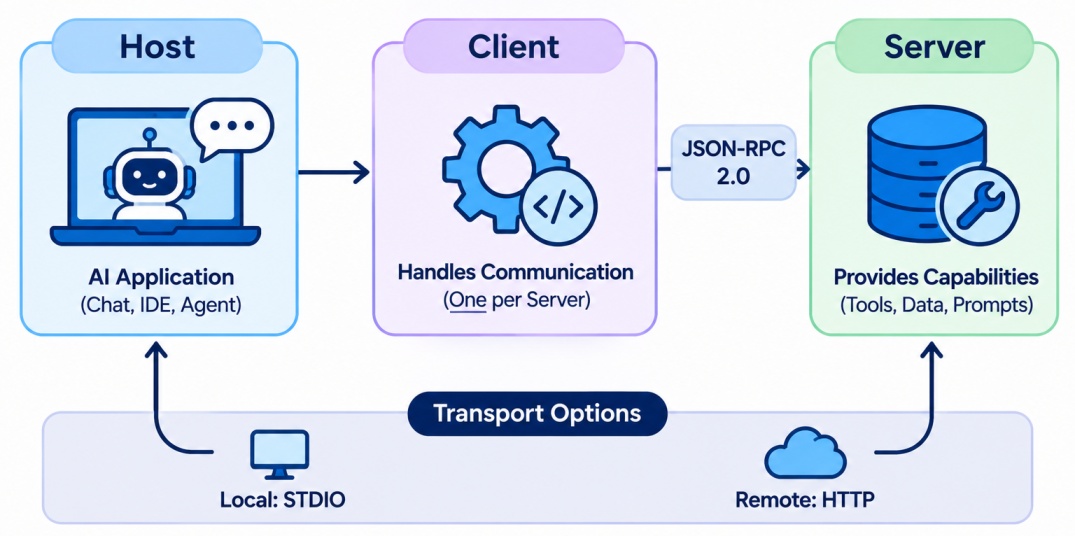
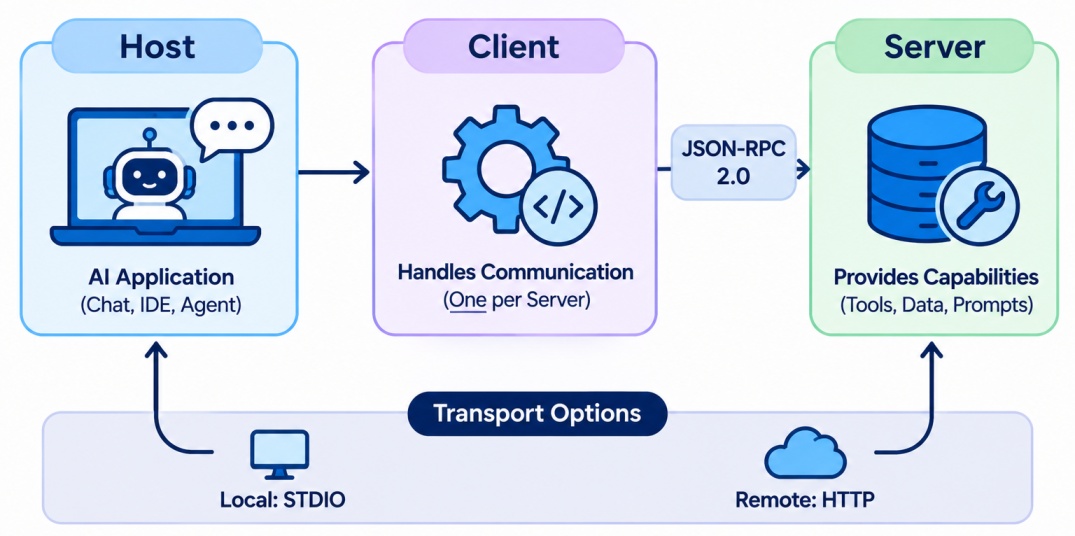
1. Host: The AI application used by the user himself, like a chat assistant, vibe coding app, or AI agent. It contains the language model, determines what permissions the user gave, and combines context from different sources.
2. The Client: Lives inside the host. Every client maintains a one-to-one relationship with a single server, adds protocol information to every request sent out, and relays messages in between. A host with three servers will contain three clients.
3. Server: Program that exposes capabilities: tools the model can call, data it can read, and prompt templates it can offer. Servers can run on the same machine as the host, such as a local file server, or remotely over the network, such as a company's calendar service.
Messages between clients and servers use JSON-RPC 2.0, and MCP borrows its message-flow ideas from the Language Server Protocol that code editors use. Local servers typically talk over standard input and output, while remote servers use an HTTP-based transport.
Core Components and Capabilities of Model Context Protocol
The core components of Model Context Protocol consist of tools which include agentic AI frameworks, resources, prompts, etc. Let’s understand them in more detail.
Component | Who Controls It | What It Does | Example |
Tools | The model | Functions the model can call to take an action or fetch live data | Look up an order, run a query, create a ticket |
Resources | The application | Read-only data identified by a URI, added to the model's context | A policy document, a file, a database record |
Prompts | The user | Reusable prompt templates the user can pick | A "summarize this ticket" template |
Elicitation | The server, through the client | A request for more input from the user mid-task | Asking which account to charge |
Extensions | Optional add-ons | Features outside the core protocol | MCP Apps for interactive interfaces, Tasks for long jobs |
Clients and servers declare which of these they support, and both sides are expected to stay within what was declared. That keeps the core small and lets new features arrive as extensions instead of breaking existing servers.
How Model Context Protocol Works?
Here's what happens when a person asks an MCP-enabled assistant, "Where is order A1001?"
The host starts or connects to the order server through a client. If it wants a list of what the server supports, the client sends a discovery request and gets back the supported protocol versions and capabilities.
The client asks the server which tools it has. Each tool comes with a name, a plain-language description, and a schema for its inputs.
The host passes those tool descriptions to the language model along with the user's question.
The model decides it needs the order tool and returns a request to call it with the order ID.
The host checks that this call is allowed, which may involve asking the user, and tells the client to send it. Each request carries its protocol version and capabilities.
The server runs the function, such as a database lookup, and returns the result.
The host puts that result into the conversation, and the model writes the final answer.
The model never touches the order system directly. It only asks, and the host and server do the work. That separation is where most of MCP's security design lives.
Building a Simple MCP Server in Python
The code below creates an order-support server with one tool, one resource, and one prompt, using the official Python SDK. It was tested with SDK version 2.3.0. Version 2 renamed the older FastMCP class to MCPServer, so if you follow tutorials written for version 1, either update the import as shown here or pin the package to a version below 2.
from mcp.server.mcpserver import MCPServer
mcp = MCPServer("order-support")
ORDERS = {"A1001": "shipped, arriving Friday", "A1002": "processing"}
@mcp.tool()
def get_order_status(order_id: str) -> str:
"""Look up the status of an order by its ID."""
return ORDERS.get(order_id, "order not found")
@mcp.resource("policy://refunds")
def refund_policy() -> str:
"""The refund policy text."""
return "Refunds are available within 30 days of purchase."
@mcp.prompt()
def summarize_ticket(ticket_text: str) -> str:
"""Prompt template for summarizing a support ticket."""
return f"Summarize this support ticket in two sentences:\n\n{ticket_text}"
if name == "__main__":
mcp.run() # stdio transport by default
In a test run, a client listed one tool named get_order_status, called it with order ID A1001, and received "shipped, arriving Friday". It also read the policy://refunds resource and got the refund policy text.
To use the server with a real assistant, you register the command that starts it in the host application's MCP settings. Each host has its own way of doing this, so check its documentation.
Model Context Protocol vs API
An API is an interface to one service, built for developers who read documentation and write code against it. The Model Context Protocol is a layer above APIs that makes those capabilities discoverable and usable by an AI model without custom code for each one.
Factor | Model Context Protocol (MCP) | API |
Primary Purpose | Connects AI applications with external tools, data sources, and services. | Enables communication and data exchange between software applications. |
Communication Standard | It adheres to a standard protocol based on JSON-RPC 2.0. | It employs different methods, including REST, GraphQL, SOAP, and RPC. |
Discovery | It provides a means of discovering tools, resources, and prompts available to AI clients using a standard interface. | It depends on API documentation, specifications, or discovery services offered by the service. |
Core Capabilities | It provides tools, resources, and prompts available to AI applications. | It provides endpoints or operations that allow data fetching, request sending, and actions performing. |
AI Compatibility | It is designed to link AI models and applications with external context and capabilities. | It supports AI applications; however, the developers may need to write custom code to connect APIs to AI applications. |
Communication Methods | It supports STDIO for local connections and Streamable HTTP for remote connections. | It commonly uses HTTP; however, the communication method varies depending on API design. |
Reusability | It allows compatible AI applications to connect to MCP servers using a common protocol. | Each API requires a separate connection and custom handling according to its design. |
Example | The AI assistant makes use of the MCP server to get access to file information, to make queries from the database, or to use GitHub. | The weather app makes use of a weather API to get current temperature and forecast information. |
Best Suited For | Connecting AI applications with multiple tools and data sources through a common protocol. | Enabling communication and specific operations between applications and services. |
Benefits and Challenges of Model Context Protocol
The Model Context Protocol has real advantages, but it also moves risk to new places. The table sets the two sides next to each other before the sections after it look at security and at when it's worth the effort.
Benefits of Model Context Protocol
Reusable connections: Build one MCP server and connect it to multiple AI applications without creating separate integrations for each application.
Reduced integration effort: MCP reduces the M × N integration burden to M + N, making it easier to connect multiple AI applications with different tools and services.
Access to live data and commands: In addition to training data, the models may have access to live data and the execution of commands through utilities that interface to them.
Open standard: MCP operates on an open standard that is served by various SDKs based on languages.
Architecture: It is an architecture where the model, the host, and the tools are segregated.
Authorization: The protocol allows for the definition of authorization in remote servers.
Growing ecosystem: Developers can access an expanding collection of ready-made MCP servers and extensions.
Challenges of Model Context Protocol
Security risks: Models can be misled by malicious text hidden in tool descriptions or other content they process.
Tool poisoning: Attackers can hide malicious instructions inside tool descriptions to influence model behaviour. This is a form of prompt injection and a documented security risk.
Implementation vulnerabilities: Initial implementations of MCP had major security flaws. An example of this is the fix made for CVE-2025-6514 in the mcp-remote package (0.1.16).
Specification changes: MCP continues to have revisions in its specification, and the 2026 revision created compatibility problems with old clients.
Constraints in the context window: The presence of too many tools will confuse the model about which tool to select and will occupy the context window.
Governance responsibilities: Organisations must establish their own policies to review, audit, and control which MCP servers employees install and use.
Conclusion
The Model Context Protocol solves a plain problem in a plain way. Instead of one-off connectors, it gives AI applications and the tools they use a common language.
If you're starting out, build a tiny server like the one above and connect it to an assistant you already use. You'll learn more from ten minutes of that than from a week of reading. Then keep the security habits from the start, because the convenience that makes the Model Context Protocol useful is the same thing that makes careless setups risky.